
Claude AI makes the call
Analyzes price, EMA, RSI, ATR, MACD, recent candles and ticks, then returns BUY, SELL, CLOSE or HOLD with its reasoning.
McRobotAi watches the XAUUSD market second by second inside your MetaTrader 5 terminal. Claude AI analyzes every opportunity, and the robot opens the trade, closes it as soon as it is in profit and writes every step to its log.
Requires Windows 10/11, MetaTrader 5 and a Claude API key
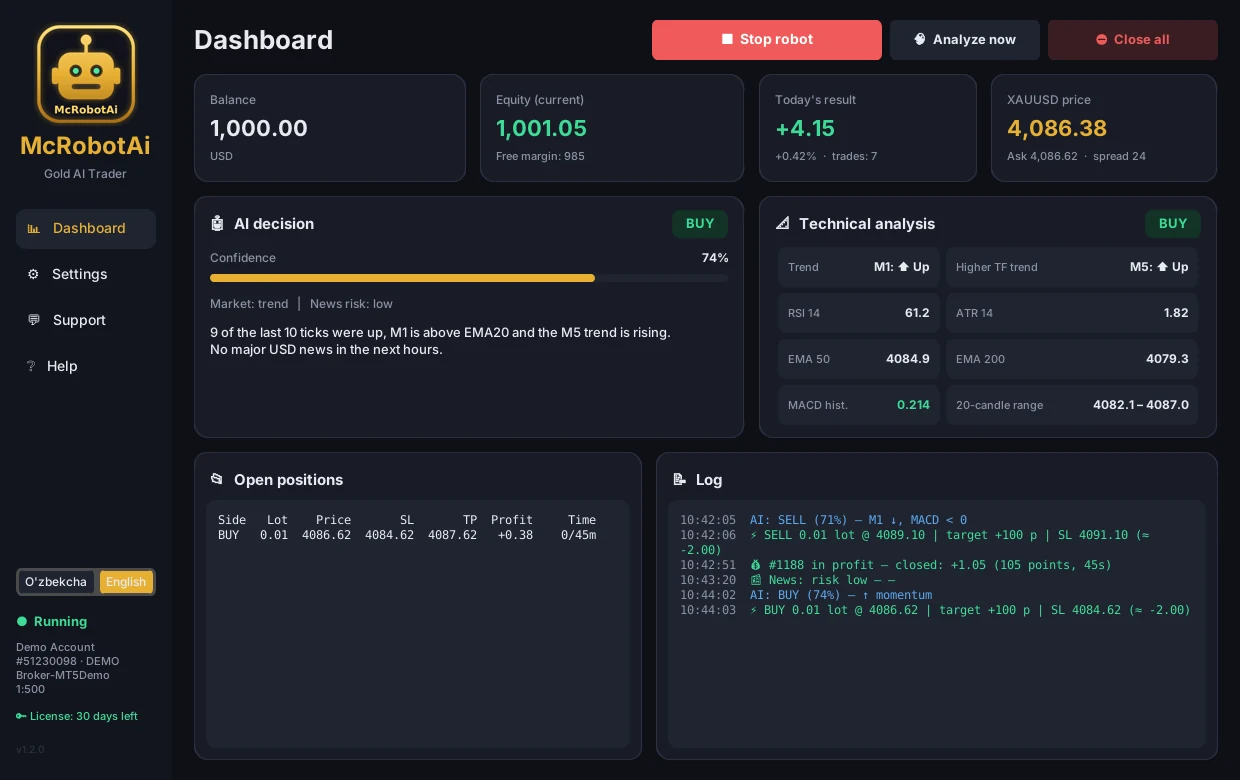
Analyzes price, EMA, RSI, ATR, MACD, recent candles and ticks, then returns BUY, SELL, CLOSE or HOLD with its reasoning.
Turbo — second-scale trades closed as soon as they are in profit. Scalp — 5–45 minutes. Intraday — several hours.
The AI checks the economic calendar online and avoids opening trades before events like FOMC, CPI or NFP.
Balance, today's result, the AI decision, technical analysis and the log in one window. Uzbek and English.
Works with any MetaTrader 5 broker. Your money stays with your broker; the robot only sends trade orders.
One click in the robot's Support section takes you to us on Telegram or by phone.
Download McRobotAi.exe for Windows. No installation — just run it.
Contact us to get an MCR-... license key. The key is bound to one computer and one MT5 account.
Enter your MT5 login, password, server and an API key from platform.claude.com in Settings.
Run it on a demo account for 2–4 weeks and watch the results. Real trading is enabled only when you allow it.
The AI decides, but it cannot change the limits below. Only you can change them in Settings.
No. No robot can guarantee profit. McRobotAi controls risk, but the market can always behave unexpectedly. Test on a demo account first.
Any broker with a MetaTrader 5 terminal: Exness, RoboForex, IC Markets and others. The symbol name (XAUUSD, XAUUSDm, GOLD) is set in Settings.
The API is billed separately by Anthropic, pay as you go. Turbo mode uses a fast, low-cost model; you can track spending and set a limit at platform.claude.com.
Yes, the computer, MT5 and McRobotAi must be running. A Windows VPS is recommended for round-the-clock operation. Every trade's SL and TP are stored on the broker's server.
Yes. Contact Support — we unbind the old device and you activate on the new computer.
Message or call us about licenses, pricing or setup.
Price1000$
00:00-00:00